About default community health files
Default community health files are a set of predefined files that provide guidance and templates for maintaining a healthy and collaborative open source project. These files help you automate and standardize various aspects of your project's development and community interaction, promoting transparency, good practices, and collaboration.
You can add default community health files to a repository called .github. For an organization with managed users, the .github repository must be internal. For all other eligible accounts, the .github repository must be public.
Note
A managed user account cannot host default community health files for their personal account because their personal .github repository can only be private.
GitHub will use and display default files for any repository owned by the account, regardless of the destination repository's visibility, that does not have its own file of that type. For supported files that can be stored in more than one location, GitHub uses the following order of precedence:
- The
.githubfolder - The root of the repository
- The
docsfolder
If no corresponding file is found in the current repository, GitHub will use the default file from the .github repository. For files that can be stored in more than one location, GitHub follows the same order of precedence in the .github repository.
For example, anyone who creates an issue or pull request in a repository that does not have its own CONTRIBUTING.md file will see a link to the default CONTRIBUTING.md from the .github repository. However, if a repository defines valid issue templates or issue template configuration in its own .github/ISSUE_TEMPLATE folder, none of the contents of the default .github/ISSUE_TEMPLATE folder will be used. This allows repository maintainers to override the default files with specific templates or content on a per-repository basis.
Storing the files in .github repository allows making changes to the defaults just in one place. Additionally, they won’t appear in the file browser or Git history of the individual repositories, and are not included in their clones, packages, or downloads.
As a repository maintainer, you can use the community standards checklist to see if your project meets the recommended community standards to help people use and contribute to your project. For more information, see About community profiles for public repositories.
About security policies
After someone reports a security vulnerability in your project, you can use GitHub Security Advisories to disclose, fix, and publish information about the vulnerability. For more information about the process of reporting and disclosing vulnerabilities in GitHub, see Coordinated disclosure of security vulnerabilities. For more information about repository security advisories, see Repository security advisories.
For an example of a real SECURITY.md file, see https://github.com/electron/electron/blob/main/SECURITY.md.
Supported file types
You can create defaults in your organization or personal account for the following community health files:
| Community health file | Description |
|---|---|
| ACCESSIBILITY.md | An ACCESSIBILITY file describes a project's accessibility goals, known barriers, and reporting process. For more information, see Adding an accessibility page to your repository. |
| CODE_OF_CONDUCT.md | A CODE_OF_CONDUCT file defines standards for how to engage in a community. For more information, see Adding a code of conduct to your project. |
| CONTRIBUTING.md | A CONTRIBUTING file communicates how people should contribute to your project. For more information, see Setting guidelines for repository contributors. |
| Discussion category forms | Discussion category forms customize the templates that are available for community members to use when they open new discussions in your repository. For more information, see Creating discussion category forms. |
| FUNDING.yml | A FUNDING file displays a sponsor button in your repository to increase the visibility of funding options for your open source project. For more information, see Displaying a sponsor button in your repository. |
| Issue and pull request templates and config.yml | Issue and pull request templates customize and standardize the information you'd like contributors to include when they open issues and pull requests in your repository. For more information, see About issue and pull request templates. If an issue template sets a label, that label must be created in your .github repository and any repositories where the template will be used. |
| SECURITY.md | A SECURITY file gives instructions on how to report a security vulnerability in your project and description that hyperlinks the file. For more information, see Adding a security policy to your repository. |
| VULNERABILITY_REPORT.yml or VULNERABILITY_REPORT.yaml | A vulnerability report form customizes the information that reporters must provide when they privately report a vulnerability. For more information, see Configuring private vulnerability reporting for a repository. |
| SUPPORT.md | A SUPPORT file lets people know about ways to get help with your project. For more information, see Adding support resources to your project. |
You cannot create a default license file. License files must be added to individual repositories so the file will be included when a project is cloned, packaged, or downloaded.
Creating a repository for default files
-
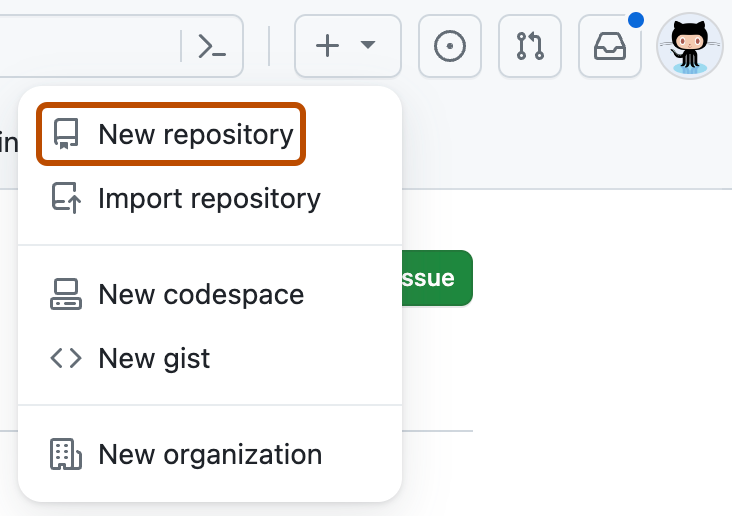
In the upper-right corner of any page, select , then click New repository.
-
Use the Owner drop-down menu, and select the organization or personal account you want to create default files for. If you are signed in with a managed user account, you must select an organization.

-
In the "Repository name" field, type .github.
-
Optionally, in the "Description" field, type a description.
-
If you are creating the repository for an organization with managed users, set the repository status to Internal. For any other eligible account, set the status to Public. A repository for default files cannot be private.
-
Toggle Add README to On.
-
Click Create repository.
-
In the repository, create one of the supported community health files. Store the file in the required location:
- Store discussion category forms in
.github/DISCUSSION_TEMPLATE. - Store issue templates and their configuration file in
.github/ISSUE_TEMPLATE. - Store
FUNDING.yml,VULNERABILITY_REPORT.yml, andVULNERABILITY_REPORT.yamlin the.githubfolder. - Store all other supported files in the root of the repository, the
.githubfolder, or thedocsfolder.
For more information, see Creating new files.
- Store discussion category forms in

